10DLC - Carrier Registration
Last updated 7 months ago
What is A2P 10DLC?
A2P 10DLC stands for Application-to-Person 10-Digit Long Code. It’s a U.S. messaging system that allows businesses to send SMS/MMS from standard 10-digit phone numbers, similar to normal local numbers, but with higher throughput and better deliverability than traditional long codes.
Why register 10DLC?
Businesses are required to register for A2P 10DLC because U.S. mobile carriers want to verify who is sending messages and what type of content they’re sending. This verification helps prevent spam and fraud, protects consumers, and ensures that only legitimate businesses use the messaging system. Registration also allows carriers to assign the proper message throughput and trust levels, which improves deliverability and reduces the chances of messages being blocked. Without registration, carriers treat the traffic as unverified and potentially harmful, so they heavily filter or even stop those messages from going through.
Who needs to register?
Who needs to register will depend on how you’d like to use Ringo:
For calling and sending SMS/MMS messages - yes you need to do carrier registration
For WhatsApp only use - no, you don’t need to register with 10DLC, however you need to do your WhatsApp Setup to be able to send message templates.
How long does it take?
The total registration timeline can differ from one case to another. Many applications are approved within 5–7 business days, while some may stay in a pending state for up to 30 days. In uncommon situations where important details cannot be confirmed quickly, the process may extend beyond 30 days. During this waiting period, you will not be able to send messages to U.S. numbers, but you can receive messages and calls.
Register with Ringo
Who can manage?
Only the account owner and admins can do US carrier registration, members do not have access to it.
How to access?
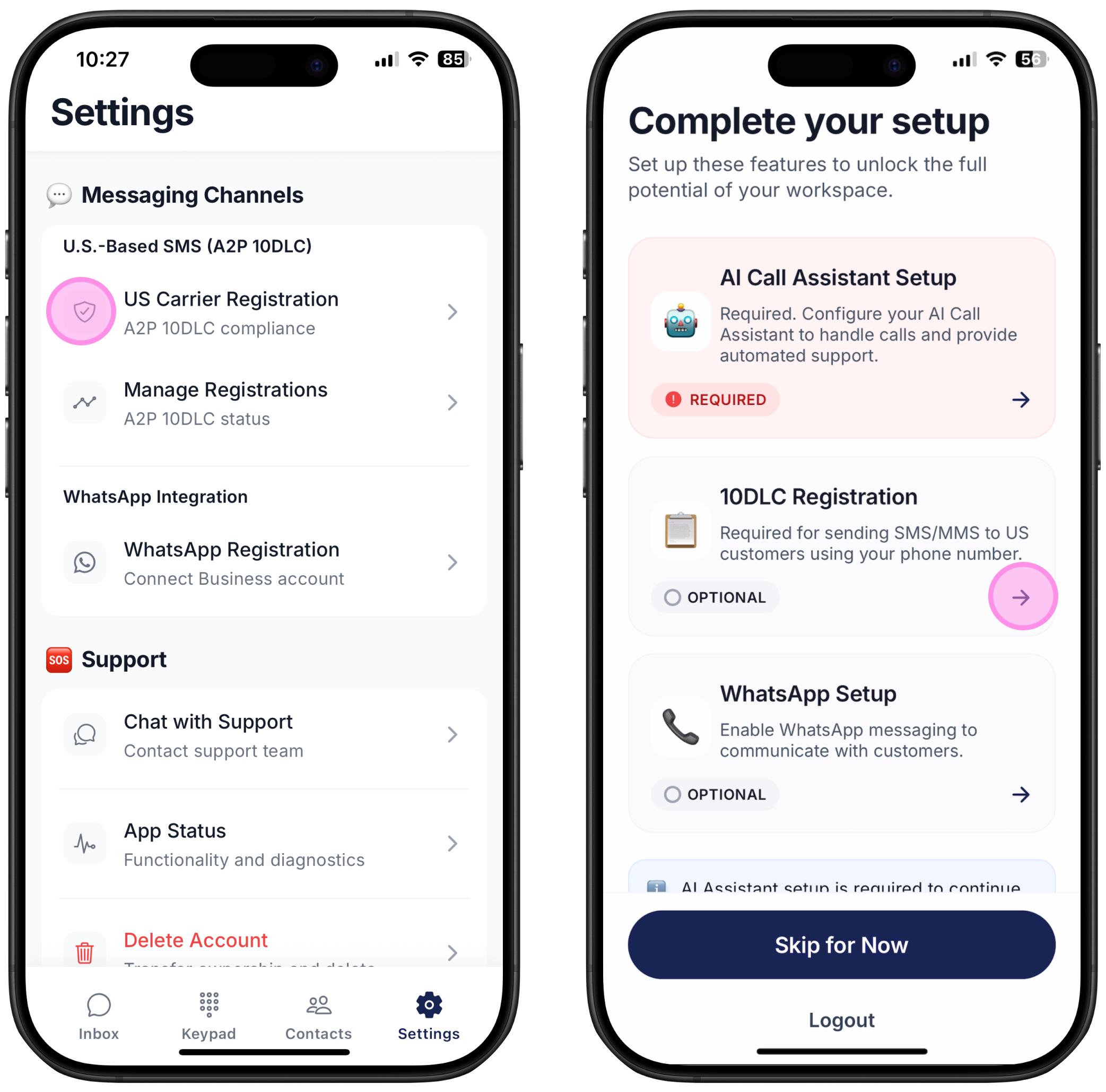
Option 1: During the Ringo onboarding process, after choosing your phone number and setting up your AI assistant, you can register directly by selecting “10DLC Registration”
Option 2: You can also register at any time by going to Settings and scrolling down to “US Carrier registration.”
Registration approval
Once you go through the process and your carrier has approved your registration we will send you a notification.
If your registration is rejected
You may need to revise your details and resubmit. Carriers treat each submission as a new review, so additional fees may apply.
Verification is performed by an external company, so we do not influence the outcome of your application. The details we receive about the decision are limited. However, you can view the rejection reason directly on the Ringo app. Use that information to make any necessary updates and submit your application again for approval.
Registration Process with Tax ID Number
To register with 10DLC the first step is knowing if you have a business with a Tax ID or not. If you do have a business with either EIN, SSN or any tax identification number please follow the steps below. If you don't have a Tax ID please check Registration with no Tax ID here.
Step 1 - Intro
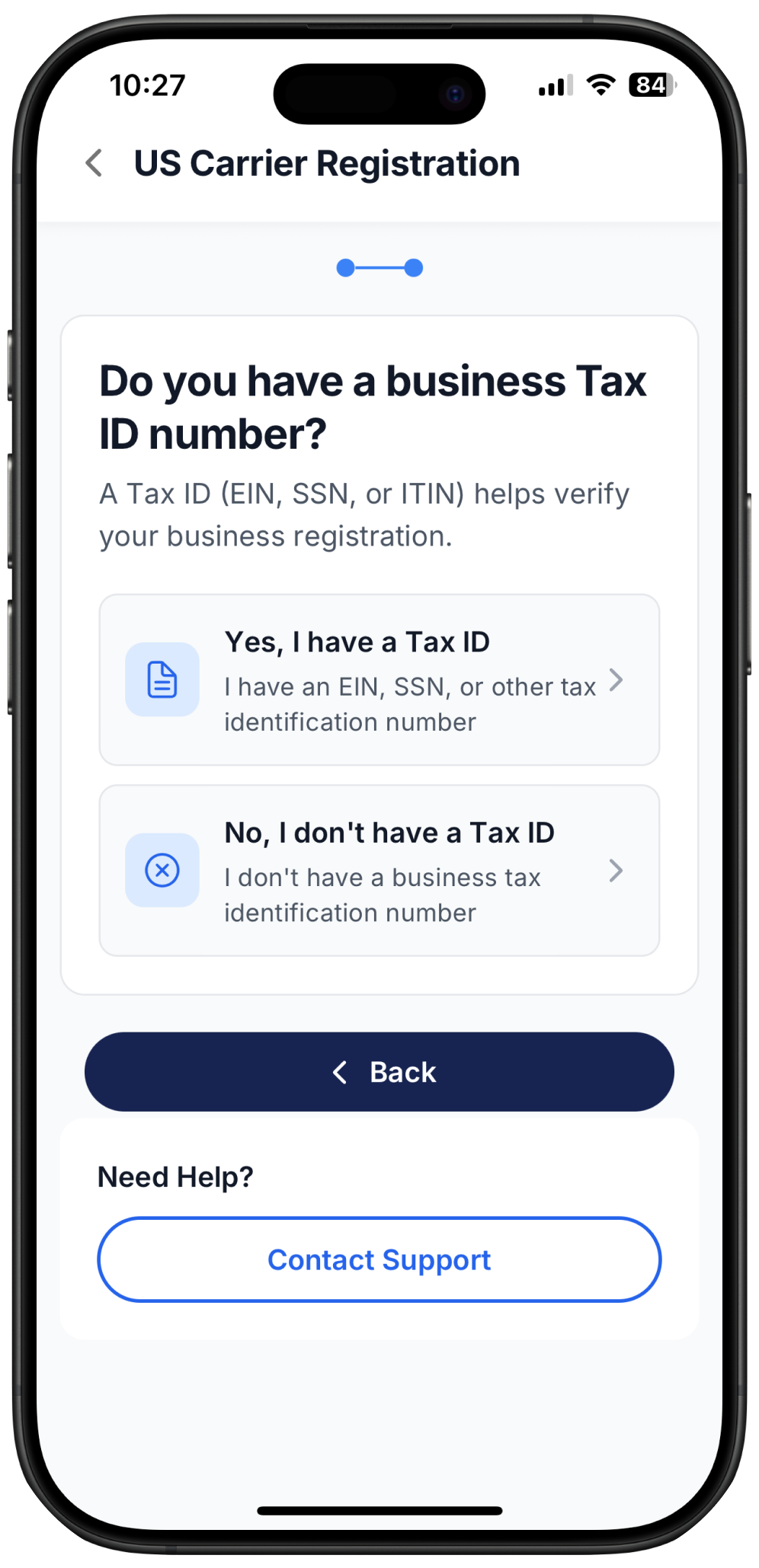
Path 1: Businesses With an EIN
Choose this option if your business has an EIN, SSN, or any official U.S. tax identification number.
To complete registration, you will need:
A valid business address that matches your tax registration
A company website or publicly searchable business listing
Standard business details (name, industry, type, description, and contact information)
This path is recommended for LLCs, corporations, partnerships, and any registered business entity with federal or state recognition.
Path 2: Without an EIN (Sole Proprietorship)
Choose this option if you do not have an EIN.
If you are unsure what an EIN is, you likely do not have one and should take this path.
Requirements:
A U.S. or Canadian residential address
A working mobile phone number that is not your Ringo number
Personal contact details rather than business registration information
This path is designed for individuals operating as sole proprietors without formal business registration.
If your business does not have a Tax ID AND you do not have a a residential address in the US or Canada, then you can’t register with 10DLC and should use a toll-free number.
Step 2 – Business Information
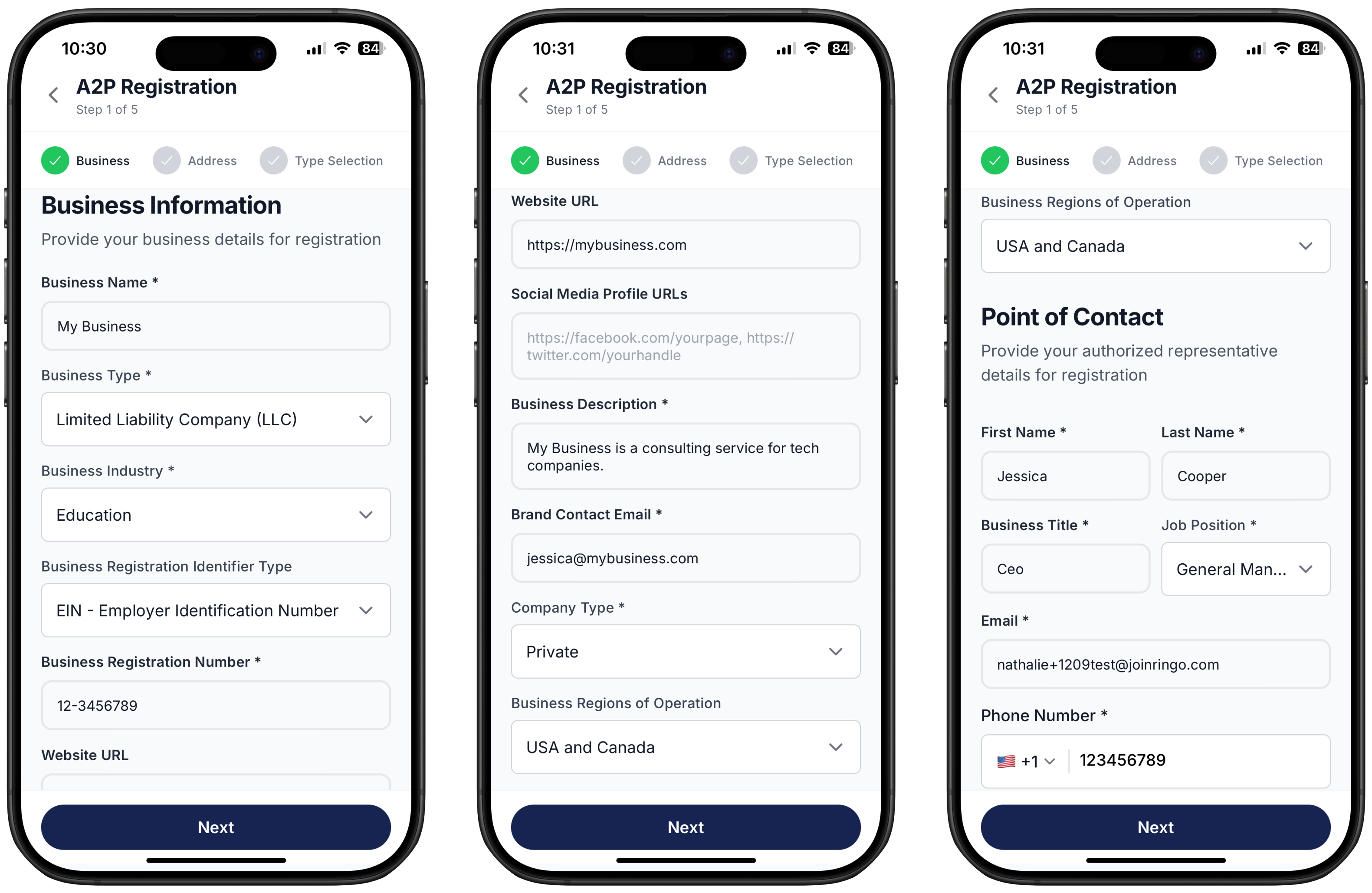
To verify your identity, carriers require detailed information about your business. You will need to enter:
Legal business name
Business type and company type
Industry
A short description of what your business does
A valid contact information
Primary point of contact details (name, email, phone)
Ensure all information matches your official business registration documents.
Step 3 – Business Address
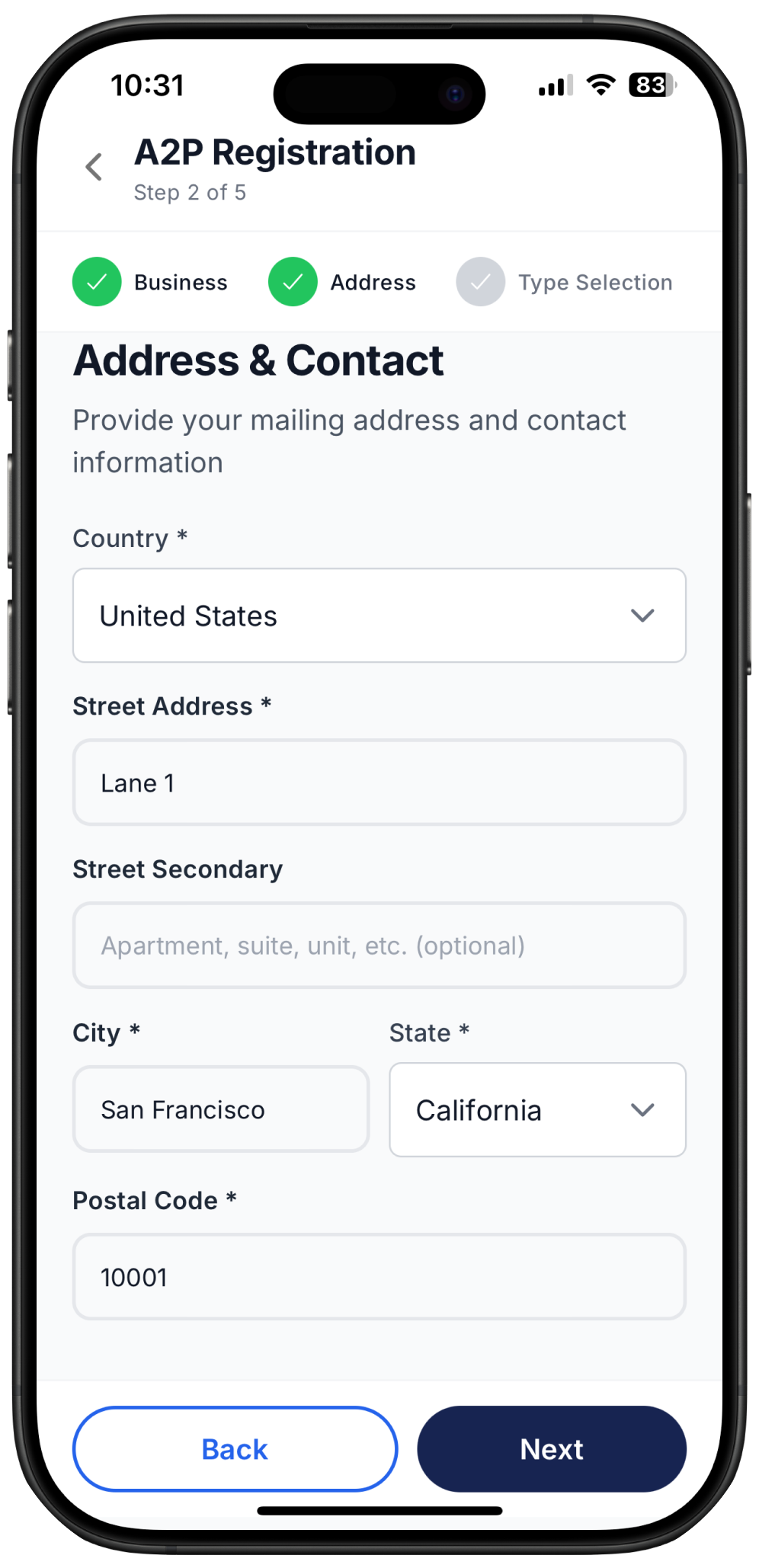
International businesses must provide a valid mailing address.
You will need to enter:
Country of residence
Street address
City
Postal code
This must match your registered business information in your home country.
Step 4 – Campaign Information
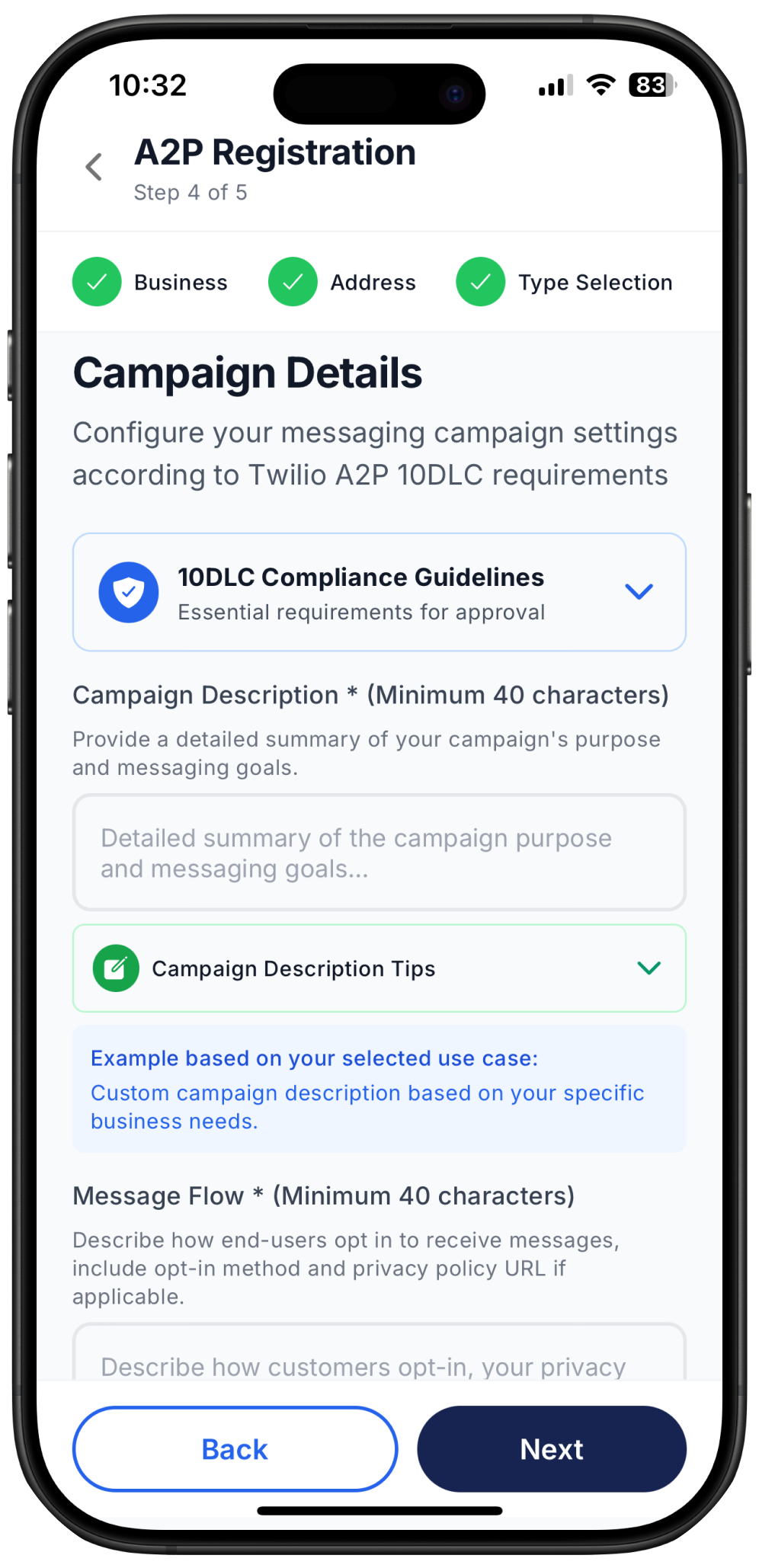
1. Campaign description
This is where you provide a clear summary of your campaign’s purpose and messaging goals. Carriers use this description to understand why you are sending messages, who receives them, and what types of content you deliver.
Tips for a strong campaign description:
Be specific about your messaging purpose and goals
Describe your target audience and who will receive the messages
Mention message frequency and timing (daily, weekly, event-based, etc.)
Include the types of messages you plan to send (alerts, reminders, updates, marketing, etc.)
Reference your business type and industry for additional context
Aim for 100–200 characters. Minimum 40 characters required for approval
Good examples:
Customer Service:
“We send customer service notifications to existing customers who have opted in. Messages include order updates, appointment reminders, and support responses. We send 2–5 messages per week per customer.”
Delivery Updates:
“We provide real-time delivery status updates to customers who place orders on our e-commerce platform. Messages include order confirmation, shipping updates, and delivery completion. Customers receive 2–4 messages per order.”
Account Alerts:
“We send account security alerts and transaction notifications to banking customers. Messages include login alerts, payment confirmations, and fraud prevention notices. Messages are sent only when account activity requires it.”
Common mistakes to avoid:
Too vague:
“We send messages to customers.”
→ Does not explain purpose, message types, or frequency.
Too brief:
“Marketing messages for sales.”
→ Under 40 characters and missing details about audience and timing.
Missing context:
“Notifications.”
→ No information about business type, audience, or what the notifications contain.
2. Message Flow
This is where you will describe how your end-users can opt-in to receive messages.
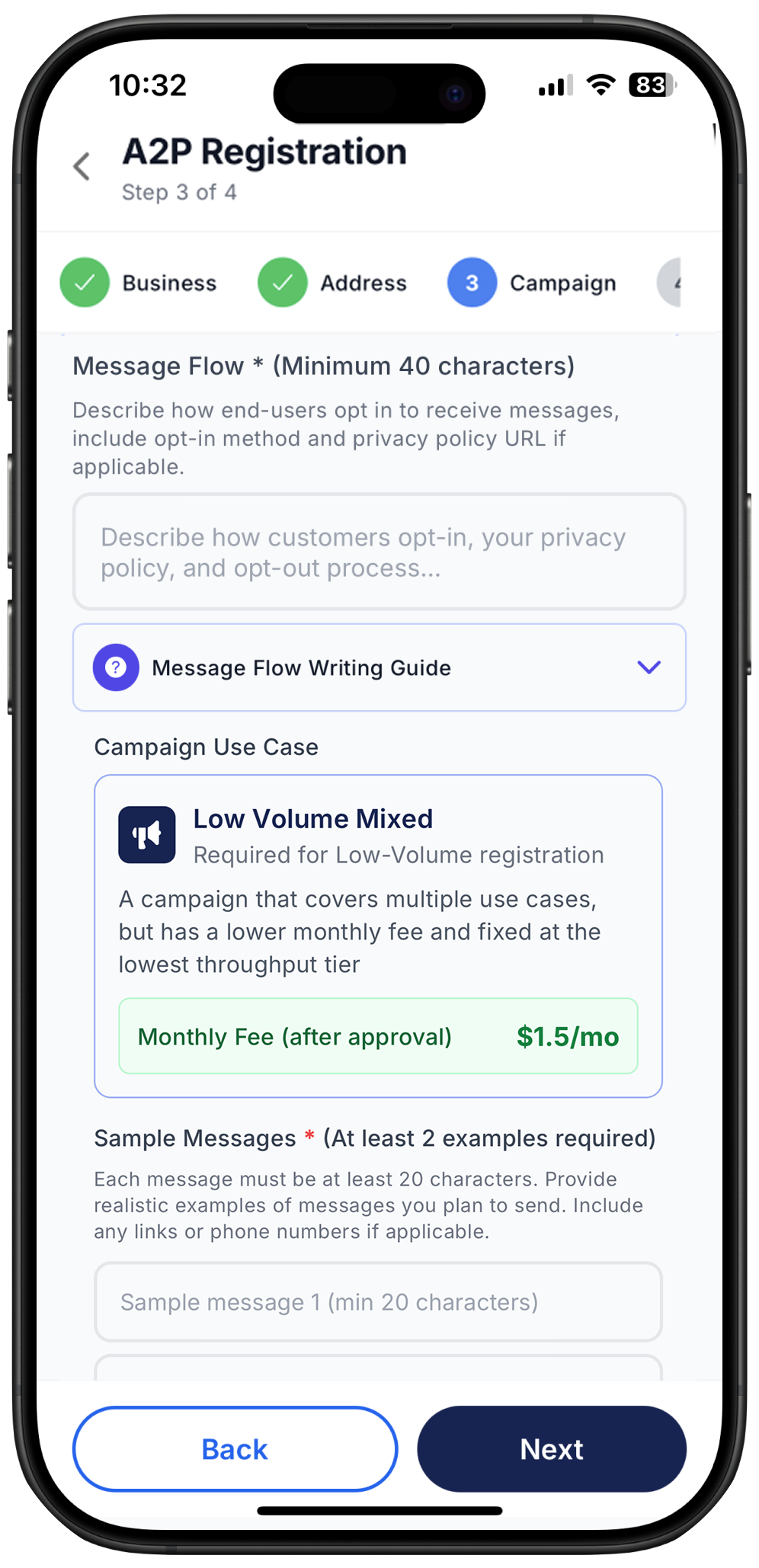
What to include:
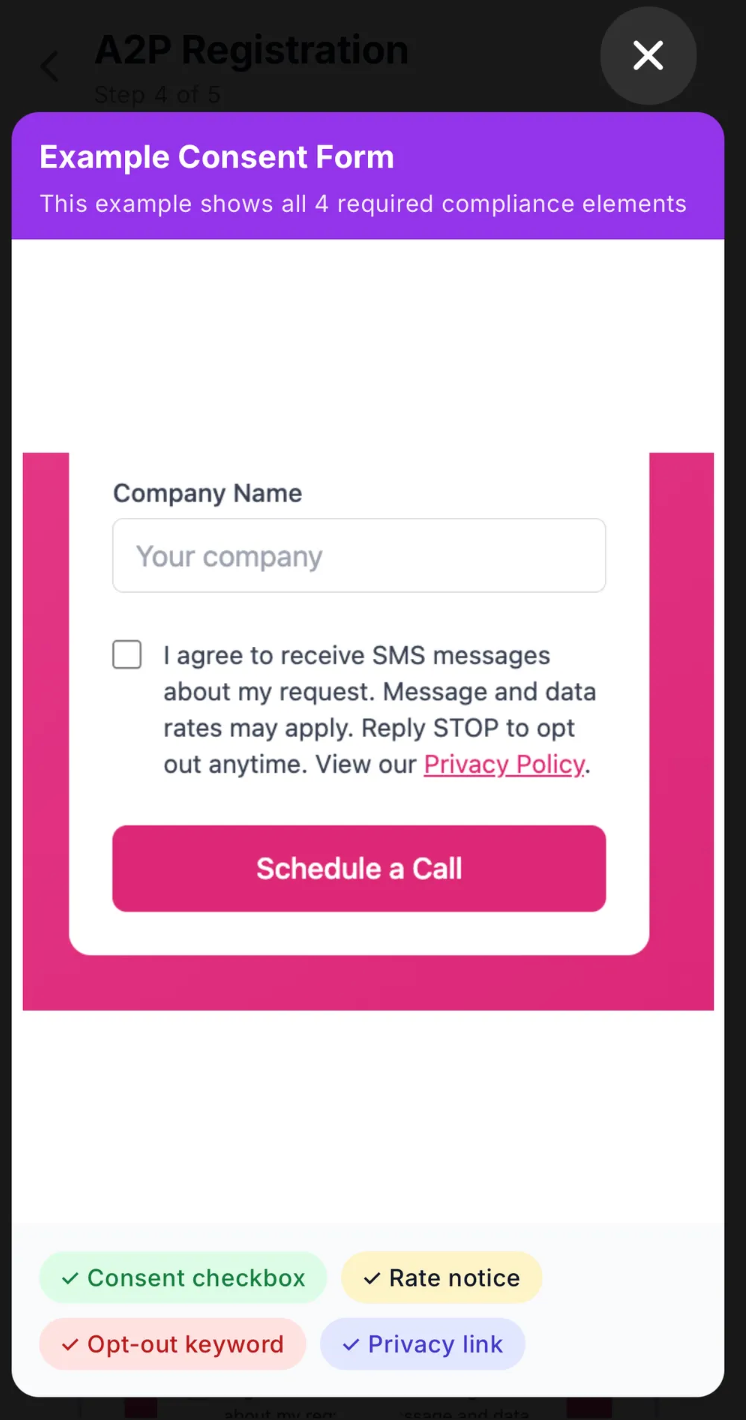
Checkbox to agree to receiving SMS – This must be clearly visible and require explicit user action.
Example: “I agree to receive SMS messages from X Business.”
Message and data rates disclosure – Inform users that standard carrier messaging and data rates may apply for SMS communications.
Reply keywords to opt out – Provide clear unsubscribe instructions.
Example: “Reply STOP to opt out at any time.”
Link to privacy policy – Include a clickable link to your privacy policy explaining how user data is collected, stored, and used.
Where to Include
Businesses must present these consent elements at every point where users provide their phone numbers. The opt-in should be clear, unambiguous, and placed before the user submits their information. Common places to include the required consent language are:
Website sign-up forms – Include the consent checkbox, opt-out instructions, and privacy policy link directly beneath the phone number field.
Checkout or registration pages – If you collect phone numbers during customer account creation or purchase flows, consent must appear at the same point.
Lead capture forms and landing pages – Any form requesting a phone number for marketing, alerts, or support must include the full consent wording.
Mobile app onboarding – If your app collects phone numbers, show the consent checkbox and notices on the same screen where the user enters their number.
In-person or verbal opt-in scenarios – You must provide a digital or written version of the consent language, and users must actively agree before receiving SMS.
After-hours or chat support widgets – If the widget collects a phone number for follow-up SMS communication, include the consent text above the “Submit” button.
Including the consent requirements at the exact moment of phone number collection ensures compliance with carrier regulations and reduces the risk of campaign rejection.
Compliant Template Example for Campaign Flow field:
Users opt-in by: 1. Checking the consent box on our website at [YourWebsite.com] 2. The consent form includes: ✓ Clear checkbox: "I agree to receive SMS messages" ✓ Notice: "Message and data rates may apply" ✓ Opt-out instructions: "Reply STOP to unsubscribe anytime" ✓ Privacy policy link: [YourPrivacyPolicyURL]
Our privacy policy explains how we handle customer data and complies with SMS regulations. Users can opt-out at any time by texting STOP, and we honor all opt-out requests immediately.
3. Use Cases
Choose Your Use Case
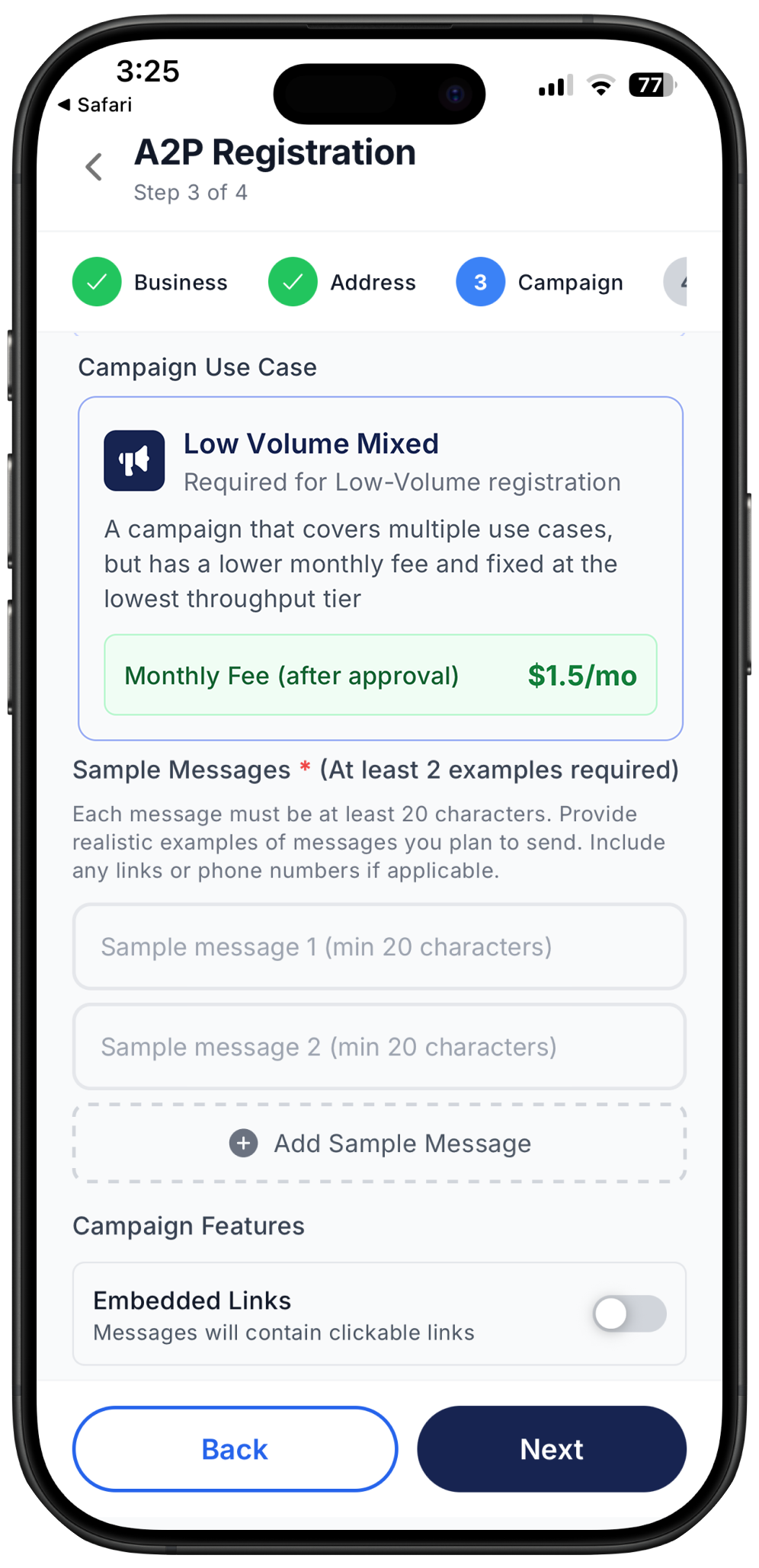
Next, you’ll select the primary use case that best describes the type of messages you plan to send. This determines your campaign classification and the monthly carrier fee that applies once the campaign is approved.
Your campaign use case will automatically be set to Low Volume Mixed Use Case at $1.50 p/m. This plan is designed for businesses sending fewer than 6,000 messages per month. These are campaign types that serve multiple purposes with mixed communication needs.
Develop Sample Messages
Based on your selected use case, you must provide at least two sample messages that closely represent the types of messages you plan to send. These don’t need to be exact copies of future messages but must accurately reflect your campaign’s purpose.
Examples:
Marketing:
“Flash sale! Get 30% off all items today only. Use code SAVE30. Shop now.”
Delivery Notification:
“Your package will arrive today between 2–4 PM. Track your delivery: abc123”
These samples help carriers understand your messaging intent and improve approval likelihood.
Campaign Features
Indicate whether your campaign will include any special message components:
Embedded links – such as websites, tracking URLs, landing pages, or login links
Embedded phone numbers – such as a business contact number included within the message
Selecting the correct features ensures proper campaign classification and prevents carrier filtering
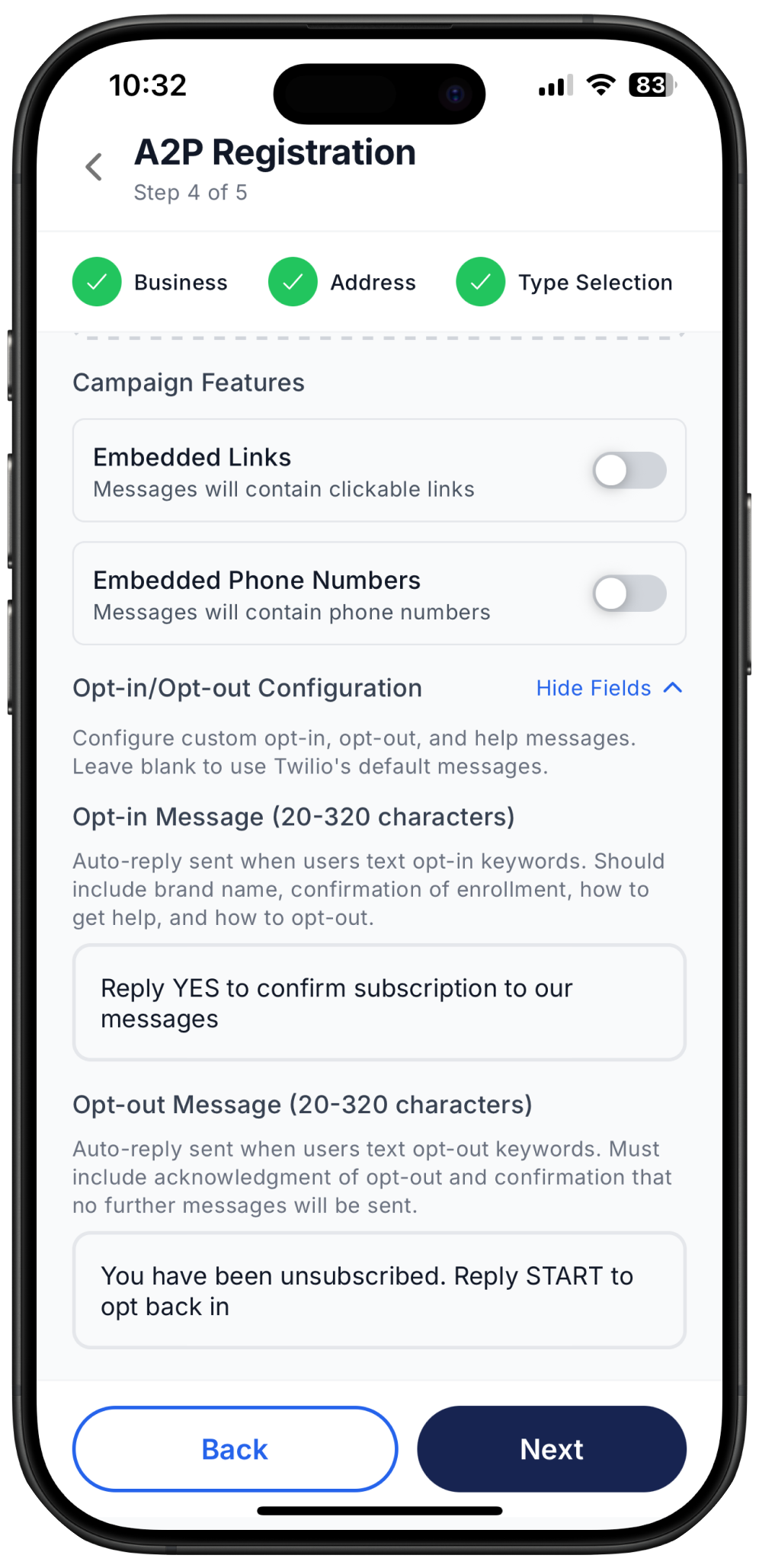
Opt-In and Opt-Out Configuration
You must define how Ringo should automatically respond when users send opt-in or opt-out keywords such as:
Opt-in: YES, START
Opt-out: STOP, UNSUBSCRIBE
These automated responses must follow carrier compliance rules.
Follow the step-by-step configuration instructions provided directly inside the Ringo app under A2P Registration.
Step 5 – Payment
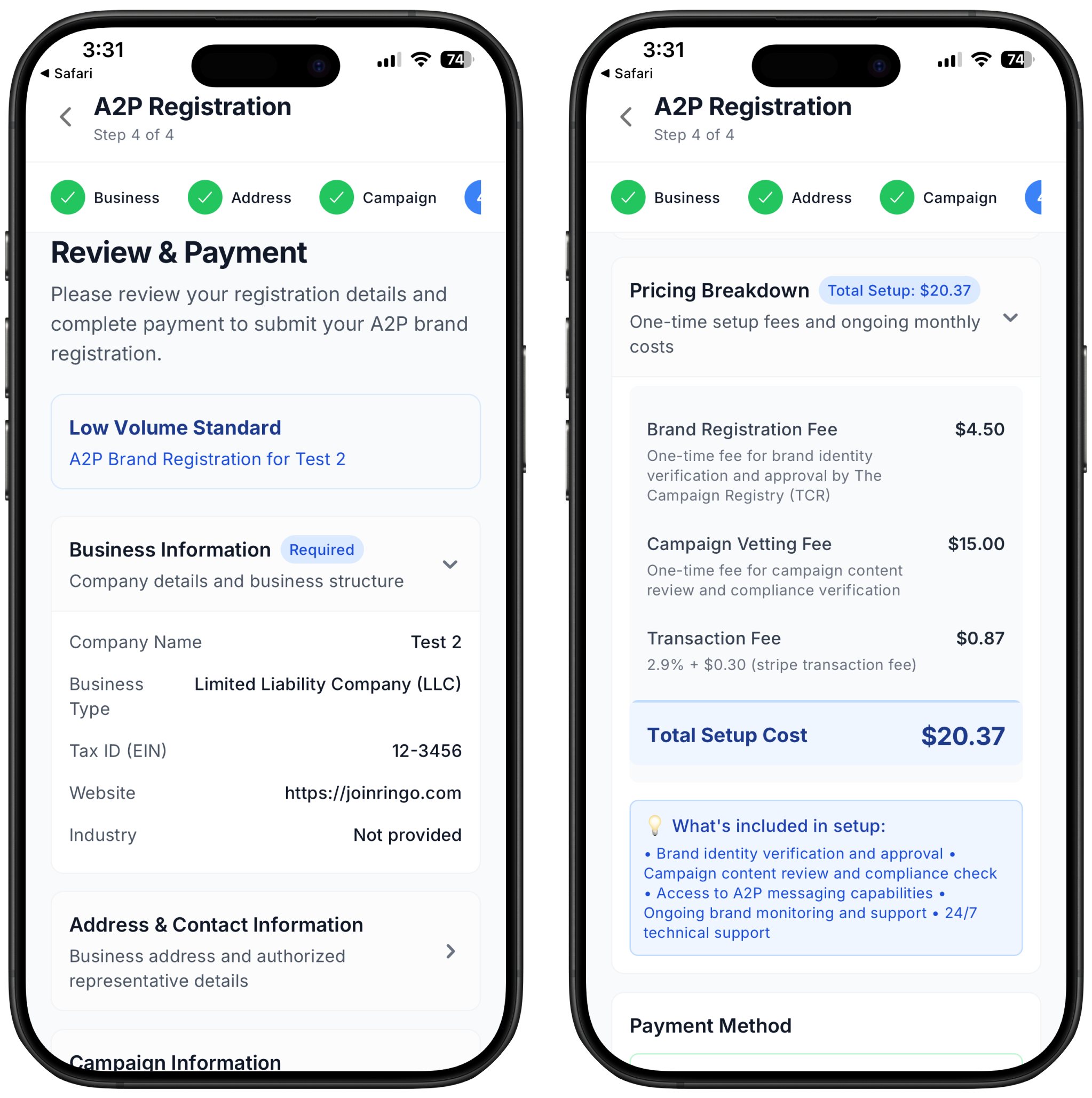
Low Volume Standard Registration Type - Designed for businesses that only send up to 6000 messages to customers each month.
Where and how you're charged:
All 10DLC fees are carrier-required pass-through fees. These fees do not go to Ringo, they are charged by The Campaign Registry (TCR), mobile carriers, and the vetting partners. Ringo simply collects these fees so your brand and campaign can be registered on the carrier network.
One-Time Setup Fees
1. Brand Registration Fee
This a $4.50 one-time fee that is a required to register your business (your “Brand”) with The Campaign Registry.
2. Campaign Vetting Fee
Each campaign (your messaging use case) must be reviewed by a third-party vetting service to ensure compliance. This is a one-time fee per campaign, charged when you create a new 10DLC campaign. This fee is always $15.00 for any business.
3. Transaction Fee
Some providers include a small administrative fee to process and pass through the required carrier costs. This is is a fixed one-time fee.
Your ongoing Low Value Standard campaign fee of $1,50 will be charged everything month together with Ringo. This fee does not go to Ringo, they are charged by The Campaign Registry (TCR), mobile carriers, and the vetting partners
After that simply include your payment method, and your 10DLC submission will start to be processed.
Registration Process Without Tax ID Number
To register with 10DLC the first step is knowing if you have a business with a Tax ID or not. If you do have a business with either EIN, SSN or any tax identification number please check Registration with Tax ID Number. If you don't then please proceed as follow below:
Step 1 - Intro
Path 1: Businesses With an EIN
Choose this option if your business has an EIN, SSN, or any official U.S. tax identification number.
To complete registration, you will need:
A valid business address that matches your tax registration
A company website or publicly searchable business listing
Standard business details (name, industry, type, description, and contact information)
This path is recommended for LLCs, corporations, partnerships, and any registered business entity with federal or state recognition.
Path 2: Without an EIN (Sole Proprietorship)
Choose this option if you do not have an EIN.
If you are unsure what an EIN is, you likely do not have one and should take this path.
Requirements:
A U.S. or Canadian residential address
A working mobile phone number that is not your Ringo number
Personal contact details rather than business registration information
This path is designed for individuals operating as sole proprietors without formal business registration.
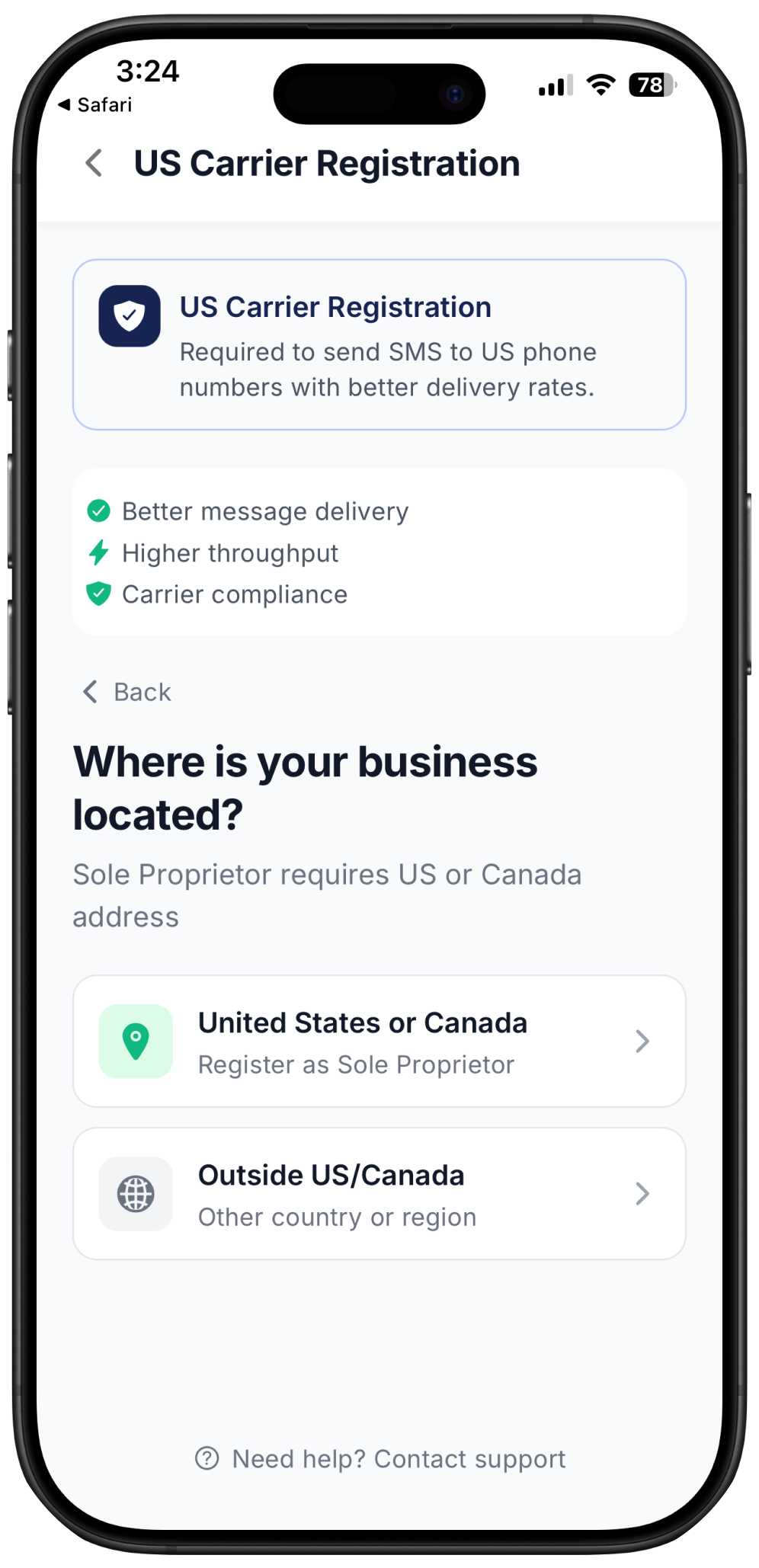
Step 2 - Business Location
Option 1: If your business is registered in the United States or Canada, then select “US or Canada” and we will guide you on how to register with 10DLC as a Sole Proprietor in the next steps below.
Option 2: If your business is registered outside the United States or Canada, then you are not allowed to register with 10DLC as it requires that you have either a Tax ID or a US/Canadian address. You can contact our support in case any questions arise here.
Step 3 – Business Information
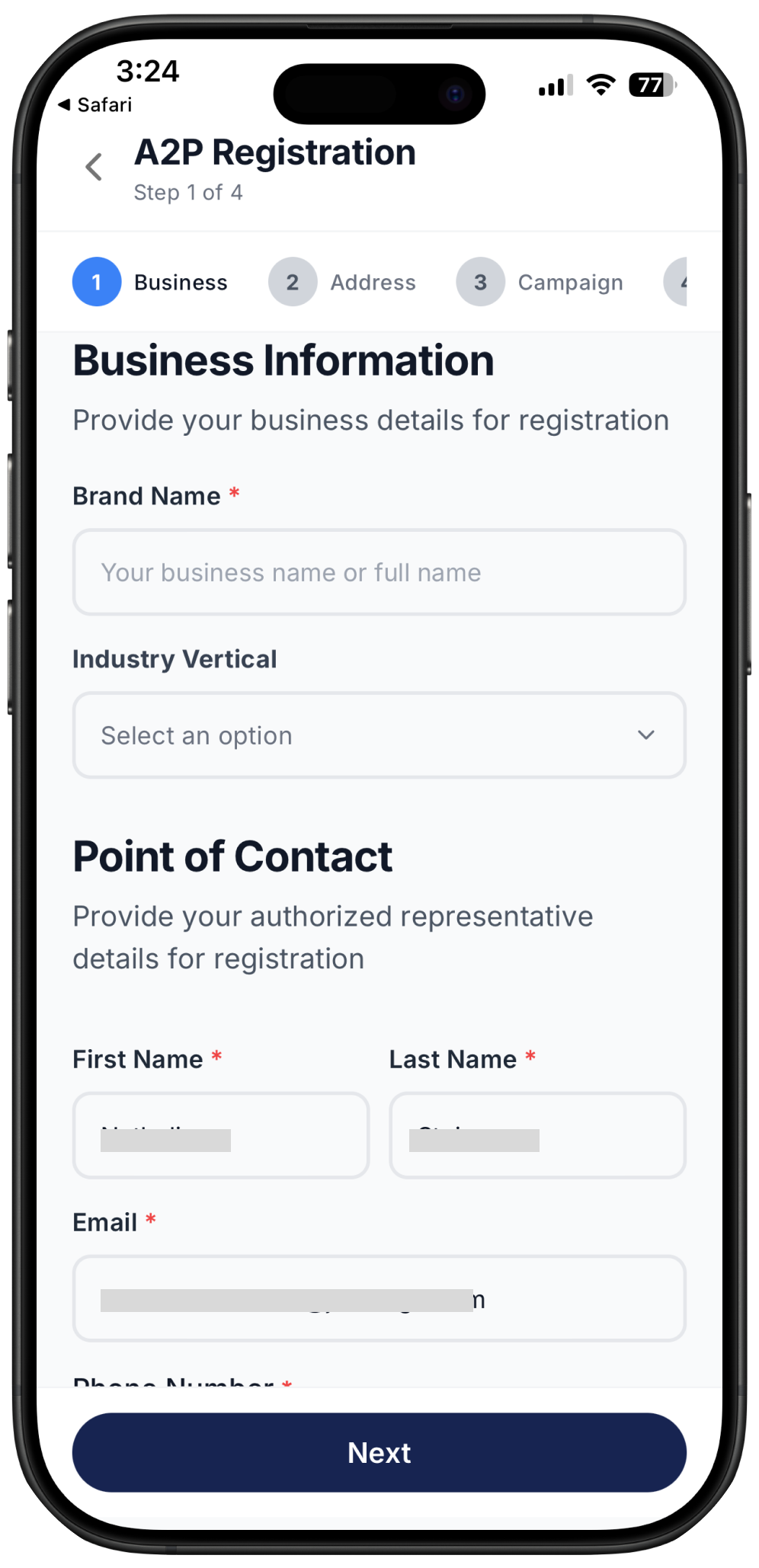
To verify your identity, carriers require detailed information about your business. You will need to enter:
Brand name
Industry
Primary point of contact details (name, email, phone)
Step 4 – Business Address
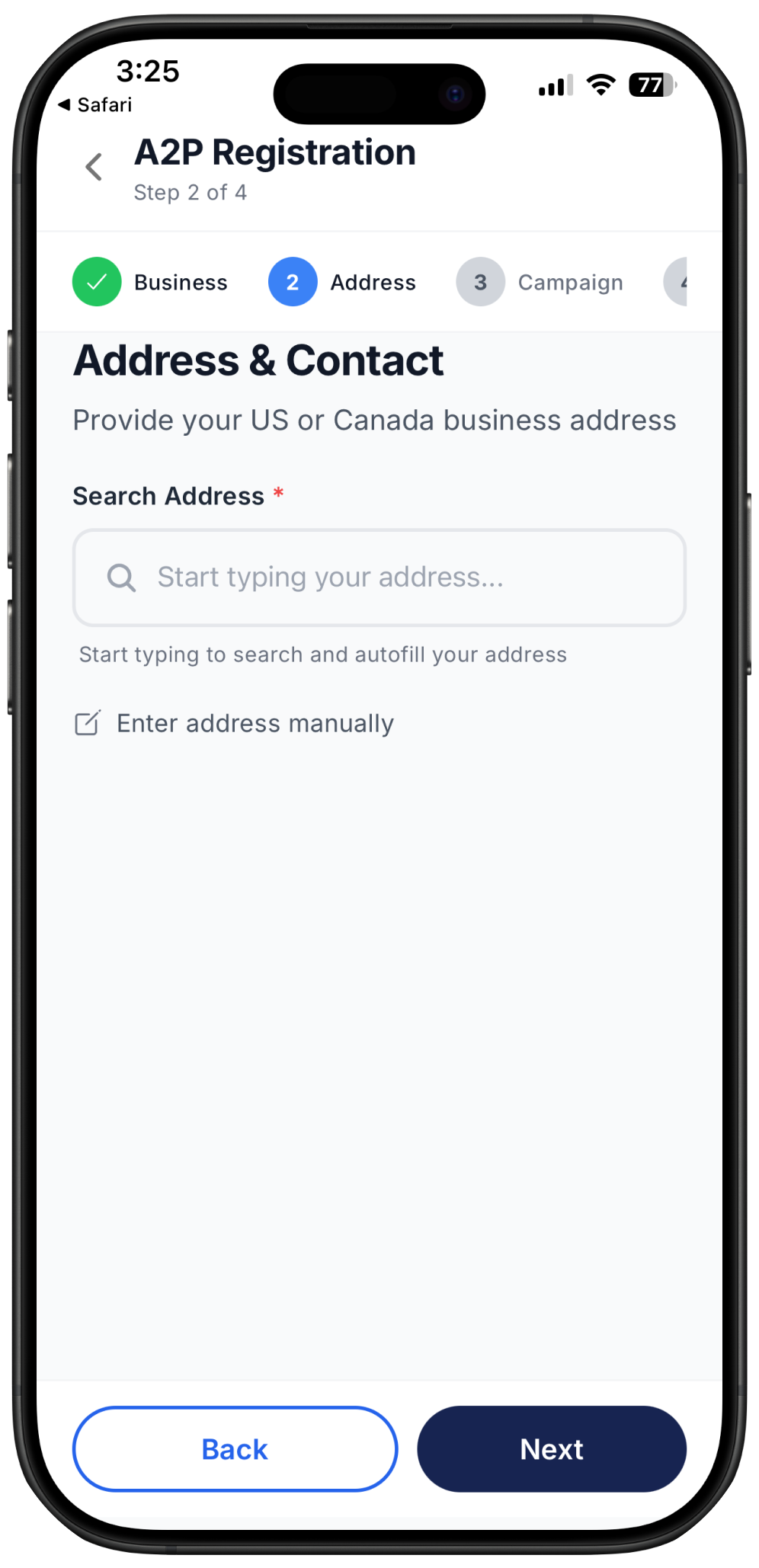
Provide your business address, ensuring it matches your registered business information.
Step 5 – Campaign Information
1. Campaign description
This is where you provide a clear summary of your campaign’s purpose and messaging goals. Carriers use this description to understand why you are sending messages, who receives them, and what types of content you deliver.
Tips for a strong campaign description:
Be specific about your messaging purpose and goals
Describe your target audience and who will receive the messages
Mention message frequency and timing (daily, weekly, event-based, etc.)
Include the types of messages you plan to send (alerts, reminders, updates, marketing, etc.)
Reference your business type and industry for additional context
Aim for 100–200 characters. Minimum 40 characters required for approval
Good examples:
Customer Service:
“We send customer service notifications to existing customers who have opted in. Messages include order updates, appointment reminders, and support responses. We send 2–5 messages per week per customer.”
Delivery Updates:
“We provide real-time delivery status updates to customers who place orders on our e-commerce platform. Messages include order confirmation, shipping updates, and delivery completion. Customers receive 2–4 messages per order.”
Account Alerts:
“We send account security alerts and transaction notifications to banking customers. Messages include login alerts, payment confirmations, and fraud prevention notices. Messages are sent only when account activity requires it.”
Common mistakes to avoid:
Too vague:
“We send messages to customers.”
→ Does not explain purpose, message types, or frequency.
Too brief:
“Marketing messages for sales.”
→ Under 40 characters and missing details about audience and timing.
Missing context:
“Notifications.”
→ No information about business type, audience, or what the notifications contain.
2. Message Flow
This is where you will describe how your end-users can opt-in to receive messages.
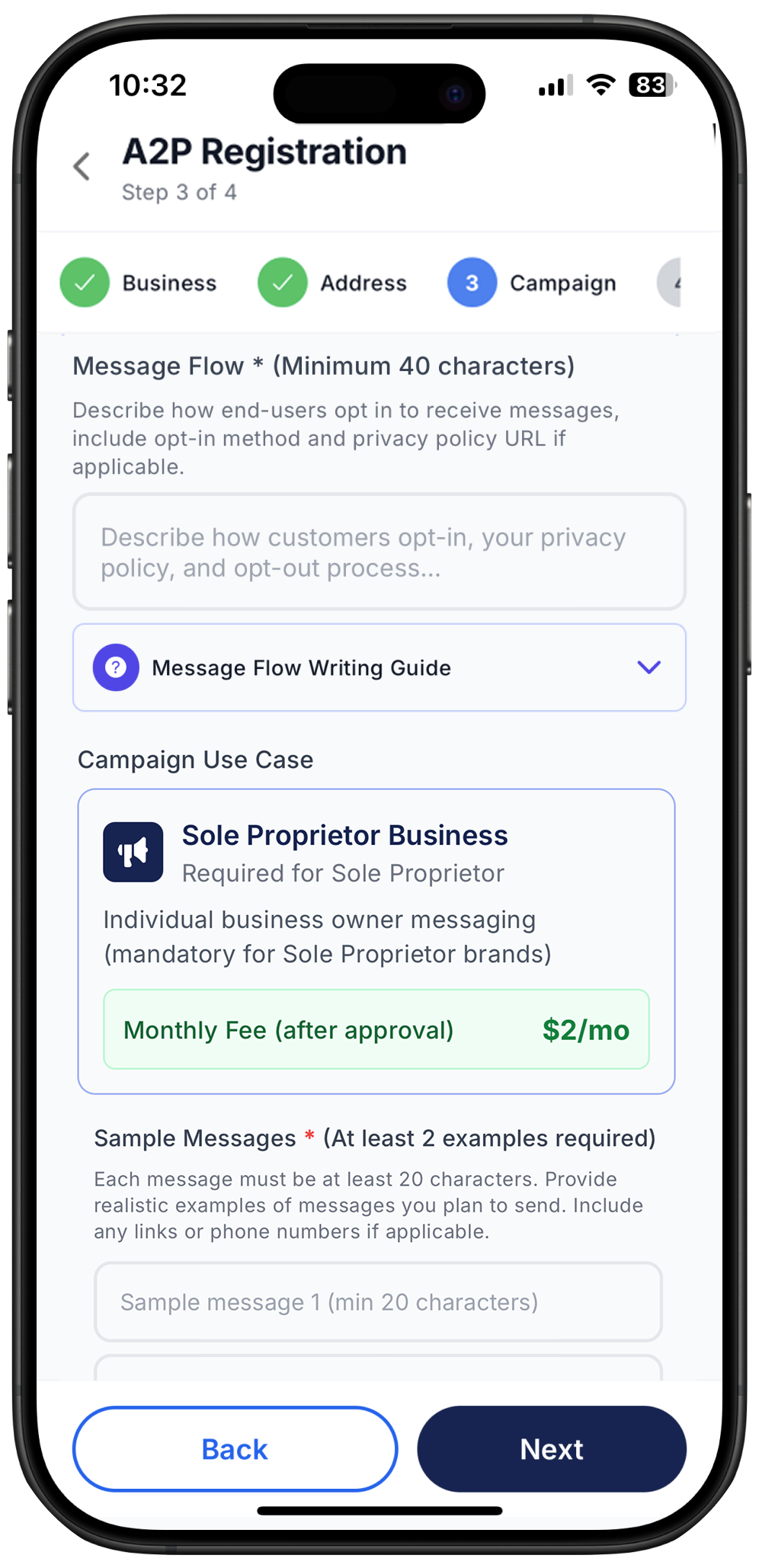
What to include:
Checkbox to agree to receiving SMS – This must be clearly visible and require explicit user action.
Example: “I agree to receive SMS messages from X Business.”
Message and data rates disclosure – Inform users that standard carrier messaging and data rates may apply for SMS communications.
Reply keywords to opt out – Provide clear unsubscribe instructions.
Example: “Reply STOP to opt out at any time.”
Link to privacy policy – Include a clickable link to your privacy policy explaining how user data is collected, stored, and used.
Where to Include
Businesses must present these consent elements at every point where users provide their phone numbers. The opt-in should be clear, unambiguous, and placed before the user submits their information. Common places to include the required consent language are:
Website sign-up forms – Include the consent checkbox, opt-out instructions, and privacy policy link directly beneath the phone number field.
Checkout or registration pages – If you collect phone numbers during customer account creation or purchase flows, consent must appear at the same point.
Lead capture forms and landing pages – Any form requesting a phone number for marketing, alerts, or support must include the full consent wording.
Mobile app onboarding – If your app collects phone numbers, show the consent checkbox and notices on the same screen where the user enters their number.
In-person or verbal opt-in scenarios – You must provide a digital or written version of the consent language, and users must actively agree before receiving SMS.
After-hours or chat support widgets – If the widget collects a phone number for follow-up SMS communication, include the consent text above the “Submit” button.
Including the consent requirements at the exact moment of phone number collection ensures compliance with carrier regulations and reduces the risk of campaign rejection.
Compliant Template Example for Campaign Flow field:
Users opt-in by: 1. Checking the consent box on our website at [YourWebsite.com] 2. The consent form includes: ✓ Clear checkbox: "I agree to receive SMS messages" ✓ Notice: "Message and data rates may apply" ✓ Opt-out instructions: "Reply STOP to unsubscribe anytime" ✓ Privacy policy link: [YourPrivacyPolicyURL]
Our privacy policy explains how we handle customer data and complies with SMS regulations. Users can opt-out at any time by texting STOP, and we honor all opt-out requests immediately.
3. Use Cases
Choose Your Use Case
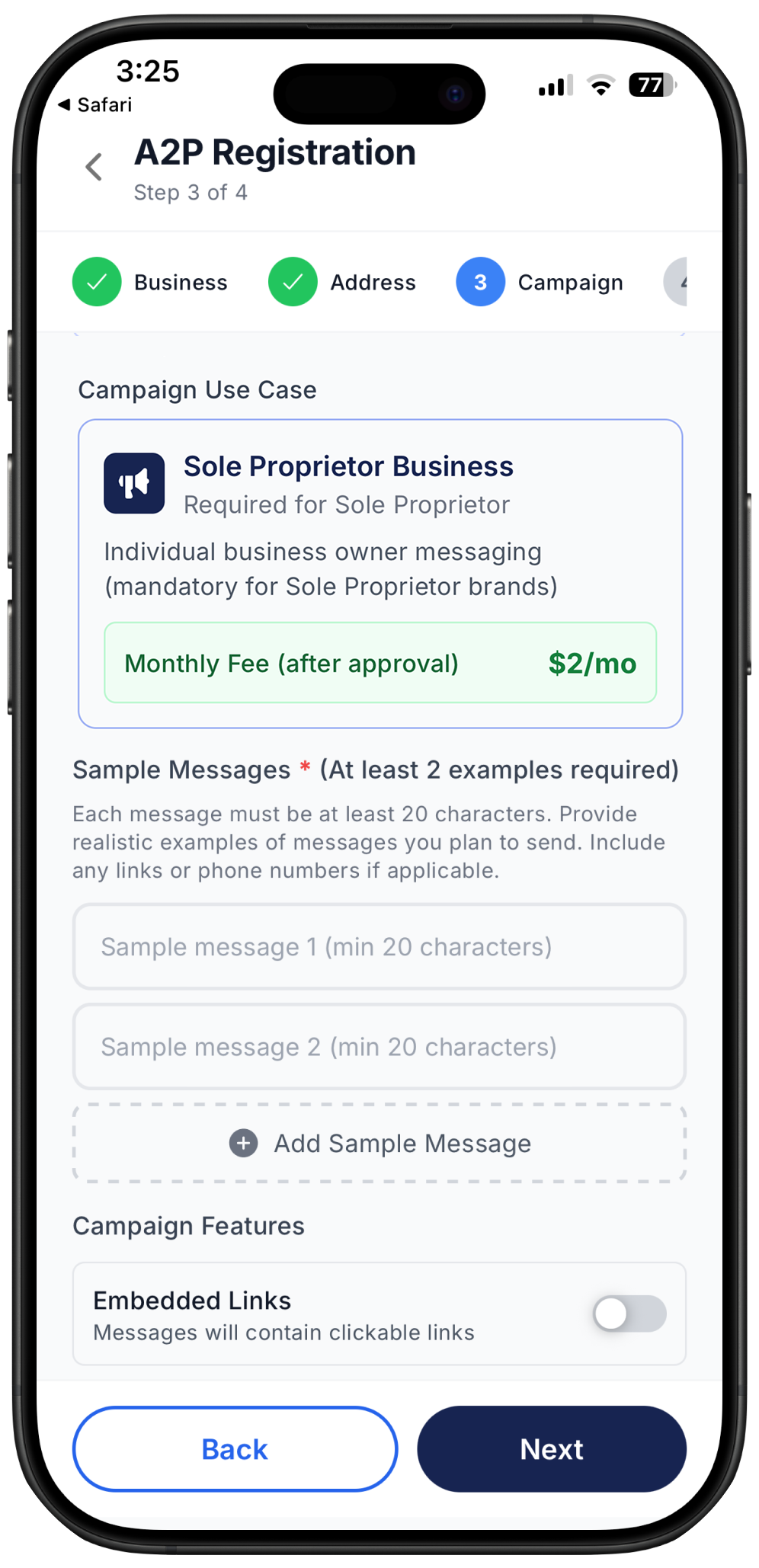
Next, you’ll select the primary use case that best describes the type of messages you plan to send. This determines your campaign classification and the monthly carrier fee that applies once the campaign is approved.
Your campaign use case will automatically be set to Low Volume Mixed Use Case at $1.50 p/m. This plan is designed for businesses sending fewer than 6,000 messages per month. These are campaign types that serve multiple purposes with mixed communication needs.
Develop Sample Messages
Based on your selected use case, you must provide at least two sample messages that closely represent the types of messages you plan to send. These don’t need to be exact copies of future messages but must accurately reflect your campaign’s purpose.
Examples:
Marketing:
“Flash sale! Get 30% off all items today only. Use code SAVE30. Shop now.”
Delivery Notification:
“Your package will arrive today between 2–4 PM. Track your delivery: abc123”
These samples help carriers understand your messaging intent and improve approval likelihood.
Campaign Features
Indicate whether your campaign will include any special message components:
Embedded links – such as websites, tracking URLs, landing pages, or login links
Embedded phone numbers – such as a business contact number included within the message
Selecting the correct features ensures proper campaign classification and prevents carrier filtering
Opt-In and Opt-Out Configuration
You must define how Ringo should automatically respond when users send opt-in or opt-out keywords such as:
Opt-in: YES, START
Opt-out: STOP, UNSUBSCRIBE
These automated responses must follow carrier compliance rules.
Follow the step-by-step configuration instructions provided directly inside the Ringo app under A2P Registration.
Step 5 – Payment
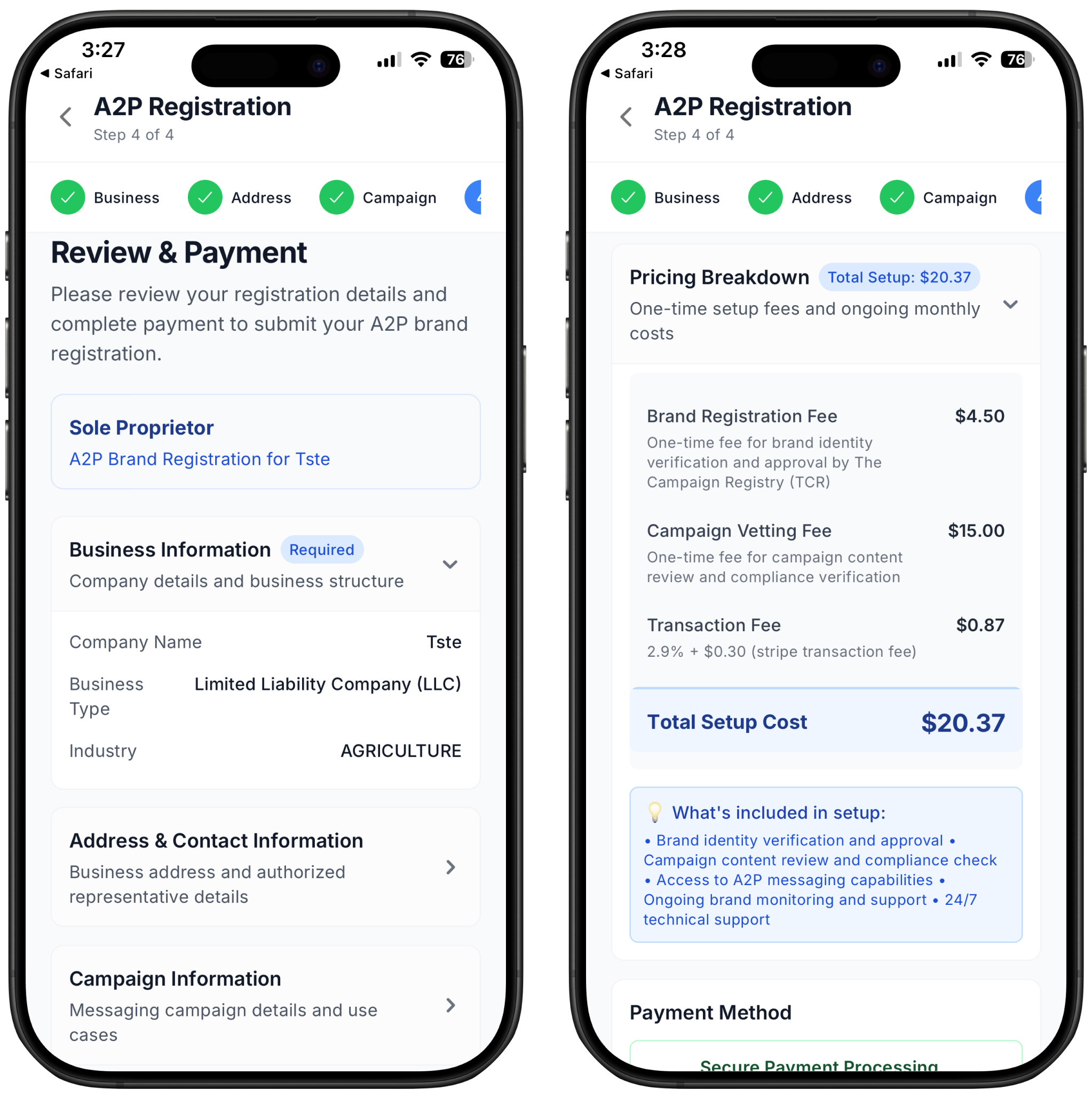
Sole proprietor registration type - Designed for businesses that to not have a Tax ID Number, however have businesses based in the US or Canada.
Where and how you're charged:
All 10DLC fees are carrier-required pass-through fees. These fees do not go to Ringo, they are charged by The Campaign Registry (TCR), mobile carriers, and the vetting partners. Your provider simply collects these fees so your brand and campaign can be registered on the carrier network.
One-Time Setup Fees
1. Brand Registration Fee
This a $4.50 one-time fee that is a required to register your business (your “Brand”) with The Campaign Registry.
2. Campaign Vetting Fee
Each campaign (your messaging use case) must be reviewed by a third-party vetting service to ensure compliance. This is a one-time fee per campaign, charged when you create a new 10DLC campaign. This fee is always $15.00 for any business.
3. Transaction Fee
Some providers include a small administrative fee to process and pass through the required carrier costs. This is is a fixed one-time fee.
After that simply include your payment method, and your 10DLC submission will start to be processed.
Your ongoing Sole Proprietorship campaign fee of $2,00 will be charged everything month together with Ringo. This fee does not go to Ringo, they are charged by The Campaign Registry (TCR), mobile carriers, and the vetting partners